
An SBOM report should give a structured view of every component, dependency and risk in a software system. Without one, you lack basic visibility into what they operate. In addition, you may fall short of what an audit needs, missing sections that regulators increasingly expect as standard, whichever jurisdiction is asking.
This blog will cover the eight sections a properly structured SBOM report should contain, and how our software supply chain security platform Qvoyant generates each one automatically rather than leaving it to manual compilation.
How does SBOM Report matter in an Audit
Before diving into contents, let’s briefly recognise why a well-crafted SBOM report is so important.
- It creates transparency over software supply chain and component usage
- It surfaces known vulnerabilities and licensing or compliance risk
- It supports procurement, vendor-risk management and regulatory compliance, particularly in finance and critical infrastructure
- It gives auditors and stakeholders a consistent view of what was assessed, what was found and how it gets remediated
An audit-ready SBOM report is foundational to supply chain risk management. The eight sections below are what separate a report that holds up under scrutiny from one that doesn’t.
The eight essential sections
Here is a breakdown of the key sections that every SBOM report should include, in the order typically seen in audit work.
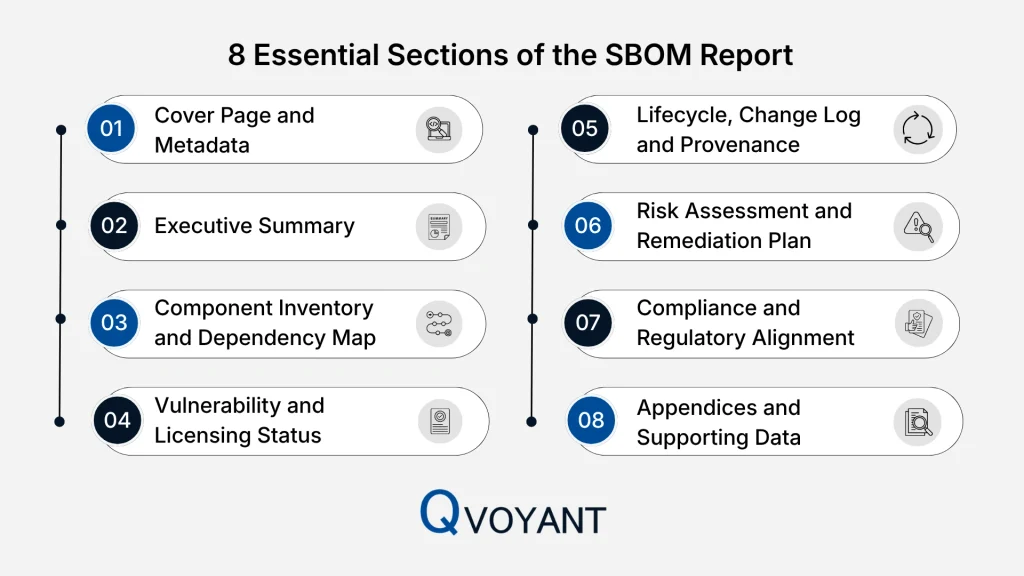
1. Cover page and metadata
Every report should open with report title and version, date of generation, scope of software systems and modules covered, name of the audit team or organisation, and an authorisation or sign-off line. This is the first component listed in most sector checklists, and it sets expectations for anyone reading the report before they reach a single technical detail.
2. Executive summary
A concise, plain-language overview for decision-makers: what the SBOM covers, high-level findings such as component count and critical risks, and key recommendations. A useful executive summary reads like “245 components identified, 17 end-of-life, remediation recommended within 90 days,” not a restatement of the technical sections that follow.
3. Component inventory and dependency map
Often the bulk of the report, and the section where manually assembled reports most commonly fall short. It should list every component in scope, open source, third party, proprietary, with name, version, supplier, and licence, along with the dependency relationships between them: which components are directly used, and which are pulled in transitively through other libraries.
Transitive dependencies are the part organisations most often miss, since they don’t appear in a direct component list. Qvoyant maps this dependency chain automatically at generation, rather than relying on someone to trace it manually component by component.
4. Vulnerability and licensing status
For each component: known vulnerabilities with CVE IDs and severity ratings, patch status, licence information and potential conflicts, and remediation status with due dates. This is what turns the report from a static inventory into an active risk dashboard. Qvoyant cross-references each component against current CVE feeds automatically, so this section reflects live exposure rather than a snapshot taken at generation time.
5. Lifecycle, change log and provenance
A one-time snapshot isn’t sufficient. This section should capture the lifecycle phase the SBOM was generated at (build, release, deployment), a change log of what’s different since the previous version, and provenance data on how each component was supplied and whether generation was automated or manual. Organisations that maintain a clear change log respond to disclosures faster, because they already know what changed and when. Qvoyant maintains this change history automatically with every regeneration, rather than requiring a manual diff between report versions.
6. Risk assessment and remediation plan
This is where inventory becomes action: a risk matrix categorising component by version age, known vulnerabilities and supplier stability, prioritised remediation for what needs immediate attention versus what can be scheduled, and a clear plan with responsible parties and timelines. Qvoyant’s risk scoring combines CVSS severity, EPSS exploitation likelihood, and reachability analysis, so prioritisation reflects which vulnerabilities are reachable in the deployed application, not just which CVEs exist somewhere in the dependency tree.
7. Compliance and regulatory alignment
Every SBOM report needs a section demonstrating it actually meets applicable regulatory requirements, not just references them. What “applicable” means depends on jurisdiction, and requirements differ meaningfully between regions. As one example, entities operating under Indian regulatory frameworks would need this section to include:
- A clear statement of which frameworks apply, including CERT-In’s Technical Guidelines on SBOM (July 2025)
- How the SBOM aligns with those guidelines specifically, machine-readable format, inclusion of transitive dependencies, and update cycle, with any gaps stated explicitly rather than assumed closed
- Sector-specific obligations, including SEBI’s Cyber Security and Cyber Resilience Framework (CSCRF), which now expects SBOM-level transparency from regulated financial entities
- How procurement and vendor workflows reflect SBOM expectations, including contractual requirements and any documented legacy-system exemptions
- A declaration that the SBOM was prepared in accordance with applicable guidelines, with attestation from responsible stakeholders where required
Qvoyant’s reporting structure captures CERT-In’s required data fields and SEBI’s CSCRF fields natively for organisations operating under Indian regulatory frameworks, so this section is a direct output of the platform rather than a manual mapping exercise performed after the fact, regardless of which region’s requirements apply.
8. Appendices and supporting data
Raw inventory tables in machine-readable format, a glossary of terms, the methodology and tooling used to generate the SBOM, evidence and logs collected during the audit, and the SBOM’s own change history. This is what supports traceability for this audit and every one that follows it.
Practical tips for preparing an SBOM report
We suggest these best practices for SBOM report:
- Automate generation. Manual spreadsheets are slow and error-prone, and accuracy degrades the moment they’re updated after the fact rather than at build time.
- Treat it as a living document. A report generated once and never refreshed is accurate for as long as the software doesn’t change, which in practice isn’t long.
- Prioritise by actual risk, not just by CVE count. Reachability and exploitability matter more than raw vulnerability volume.
- Write the executive summary for non-technical stakeholders. That section and the risk assessment are what leadership actually reads.
- Keep formats standardised. SPDX or CycloneDX ensures downstream tools and auditors can consume the report without reformatting.
- State gaps explicitly. If a component can’t be identified or a dependency is opaque, note it directly rather than implying completeness.
Conclusion
An SBOM report is more than a component list. Done properly, it’s part audit deliverable, part risk dashboard, part governance artefact, covering everything from metadata and component inventory through to remediation planning and regulatory alignment.
Qvoyant generates each of these eight sections directly from a live SBOM, so an audit-ready report is a by-product of how the SBOM already gets maintained, not a separate document assembled under deadline pressure. See how it works for your next audit.
SBOM Report FAQs
How often should an SBOM report be produced?
At minimum, alongside major releases, patches, or quarterly reviews. Continuous generation is preferable to a fixed schedule.
Does an SBOM report cover only open-source components?
No. It should cover every component in scope, open-source, third-party, and proprietary, to give full supply-chain transparency.
What format should the SBOM inventory be in?
Both a human-readable report and a machine-readable file in a standard format such as SPDX or CycloneDX, to support automation and integration.
What are the common pitfalls when preparing an SBOM report?
Missing transitive dependencies, out-of-date component versions with no vulnerability data attached, no clear remediation ownership, and weak alignment with regulatory expectations.